
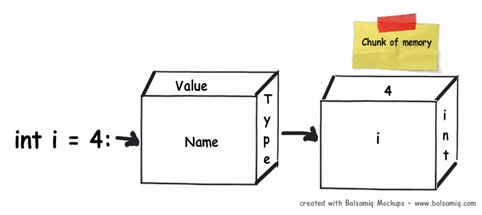
When you declare a variable in a .NET application, it allocates some chunk of memory in the RAM. This memory has three things: the name of the variable, the data type of the variable, and the value of the variable.
That was a simple explanation of what happens in the memory, but depending on the data type, your variable is allocated to that type of memory. There are two types of memory allocation: stack memory and heap memory. In the coming sections, we will try to understand these two types of memory in more detail.
Stack and Heap
In order to understand stack and heap, let’s understand what actually happens in the below code internally.
public void Method1()
{
    // Line 1
    int i=4;

    // Line 2
    int y=2;

    //Line 3
    class1 cls1 = new class1();
}
It’s a three-line code, let’s understand line by line how things execute internally.
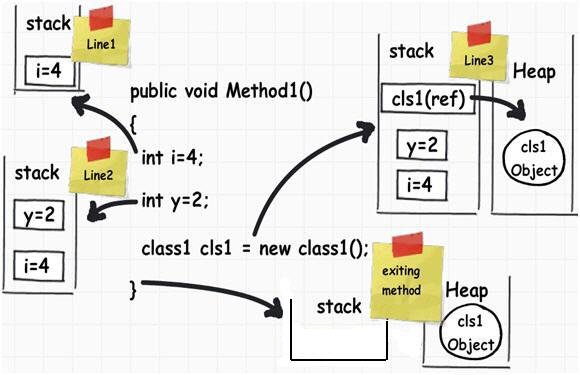
Memory allocation and de-allocation are done using LIFO (Last In First Out) logic. In other words, memory is allocated and de-allocated at only one end of the memory, i.e., the top of the stack.
- Line 1: When this line is executed, the compiler allocates a small amount of memory in the stack. The stack is responsible for keeping track of the running memory needed in your application.
- Line 2: Now the execution moves to the next step. As the name says stack, it stacks this memory allocation on top of the first memory allocation. You can think about a stack as a series of compartments or boxes put on top of each other.
- Line 3: In line 3, we have created an object. When this line is executed, it creates a pointer on the stack and the actual object is stored in a different type of memory location called ‘Heap’. ‘Heap’ does not track running memory, it’s just a pile of objects which can be reached at any moment in time. Heap is used for dynamic memory allocation.
One more important point to note here is reference pointers are allocated on the stack. The statement, Class1 cls1; does not allocate memory for an instance of Class1, it only allocates a stack variable cls1 (and sets it to null). The time it hits the new keyword, it allocates on “heap”.
Exiting the method: Now finally the execution control starts exiting the method. When it passes the end control, it clears all the memory variables which are assigned on the stack. In other words, all variables which are related to int data types are de-allocated in ‘LIFO’ fashion from the stack.
The big catch – It did not de-allocate the heap memory. This memory will be later de-allocated by the garbage collector.
Now many of our developer friends must be wondering why two types of memory, can’t we just allocate everything on just one memory type and we are done?
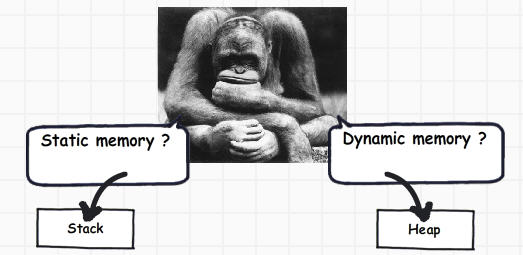
If you look closely, primitive data types are not complex, they hold single values like ‘int i = 0’. Object data types are complex, they reference other objects or other primitive data types. In other words, they hold a reference to other multiple values and each one of them must be stored in memory. Object types need dynamic memory while primitive ones need static type memory. If the requirement is dynamic memory, it’s allocated on the heap or else it goes on a stack.
Thanks to Shivprasad Koirala for such an amazing article.