
🕌 Modern, User-Friendly Prayer Times Application
Completely free, portable prayer times application for Windows — no installation required.
Supports 203 countries and 4,120+ cities worldwide.
✨ Features
- 🌍 Global Support: 203 countries, 4,120+ cities worldwide
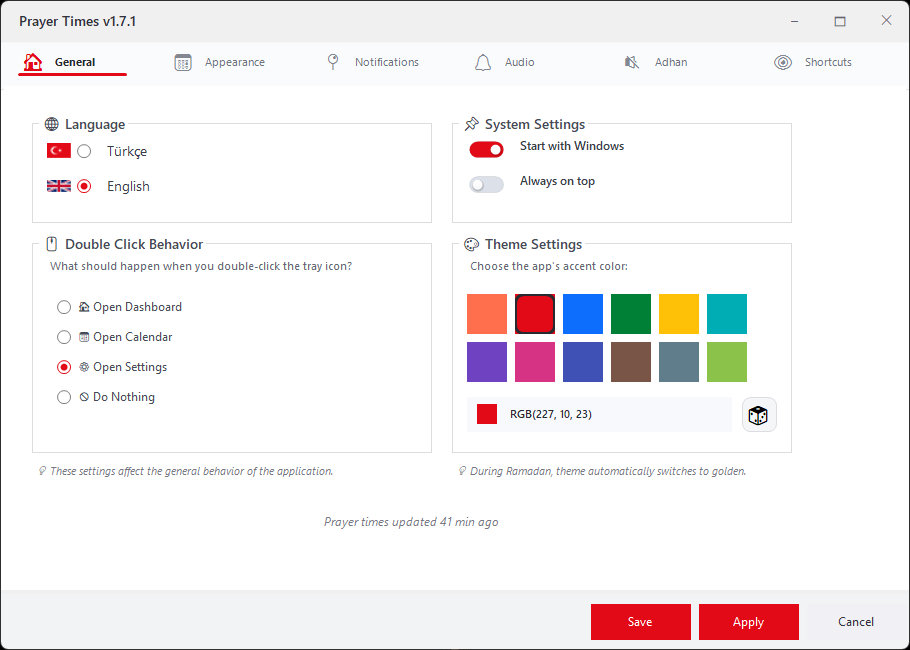
- 🇹🇷 🇬🇧 Bilingual: Turkish and English interface
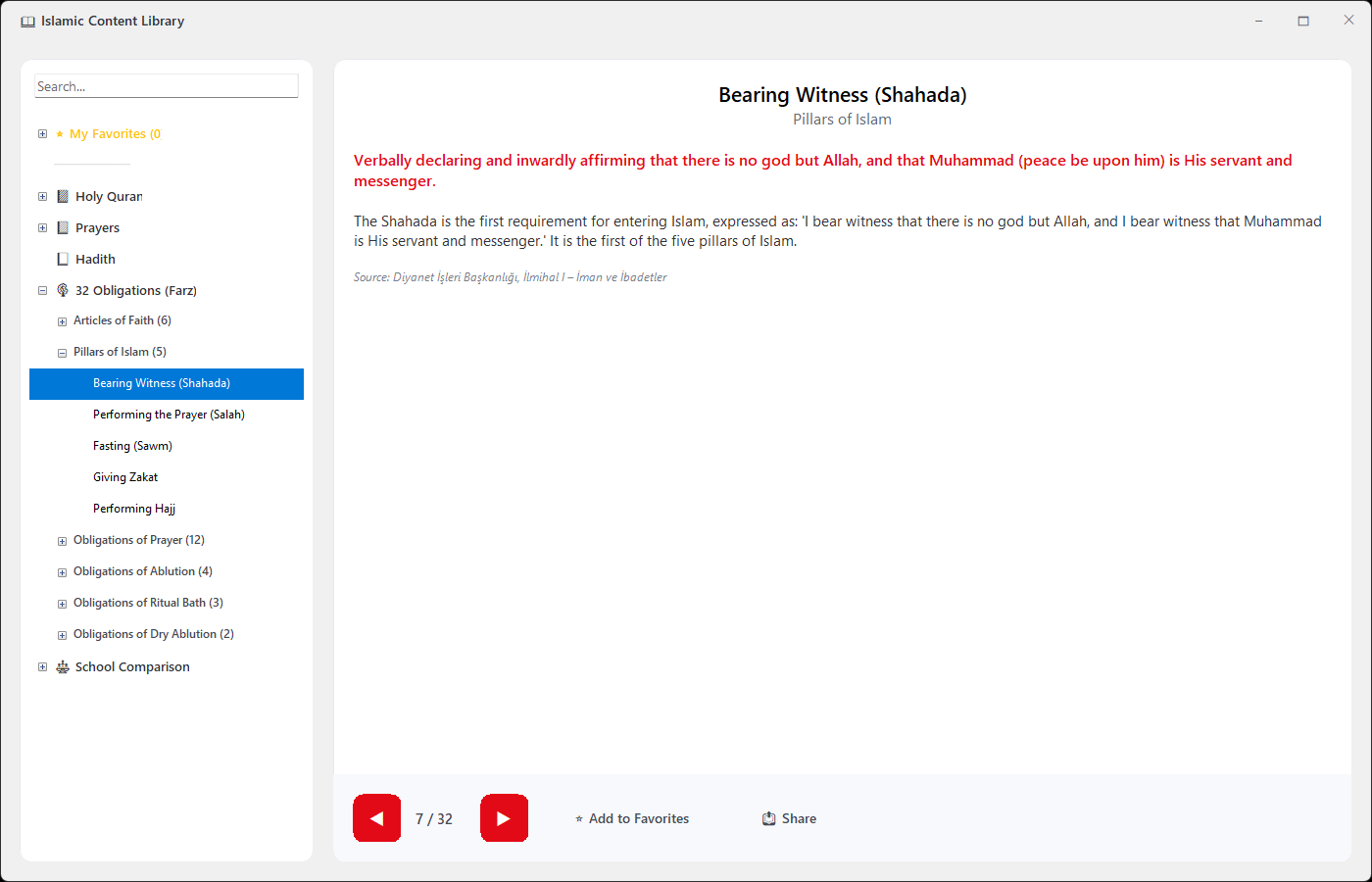
- 📖 Islamic Library: Surahs, prayers, 40 hadiths, the 32 Obligations (Farz) and a four-school comparison (favorites & smart search)
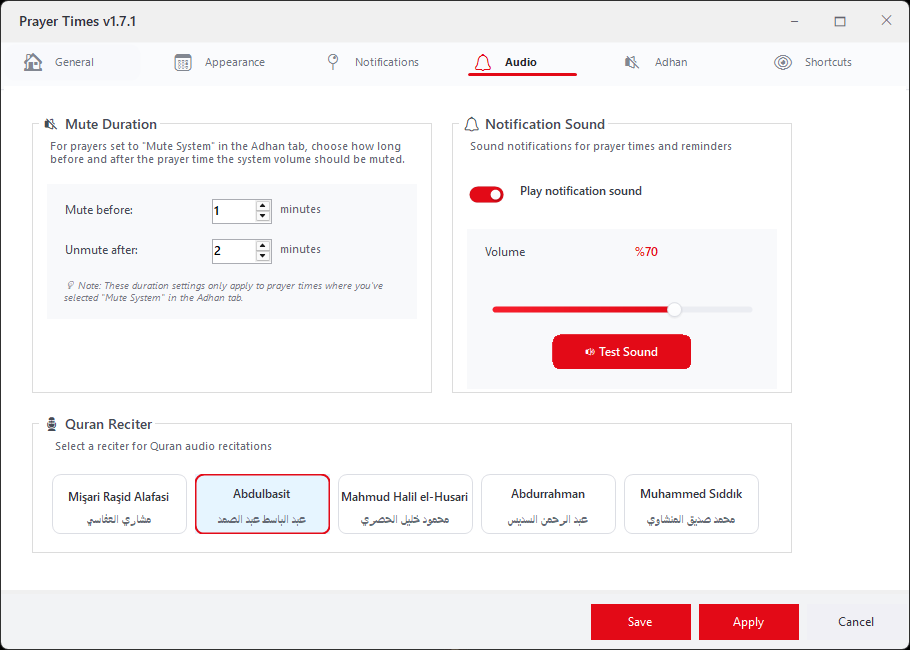
- 🎙️ Quran Audio: 5 reciters, download, offline playback
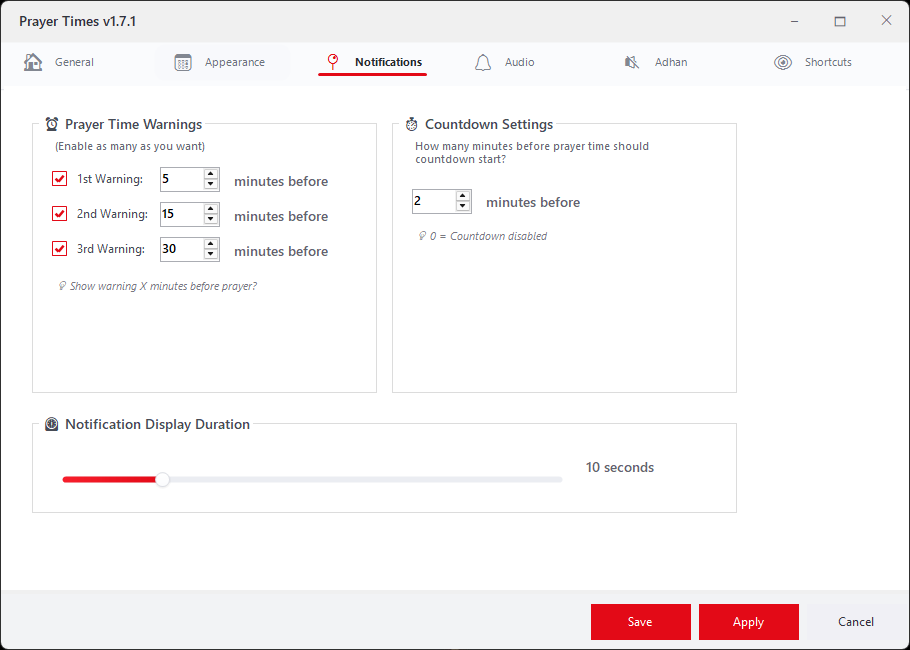
- ⏰ Smart Notifications: 3 independent warning system (e.g., 5-20-45 minutes before)
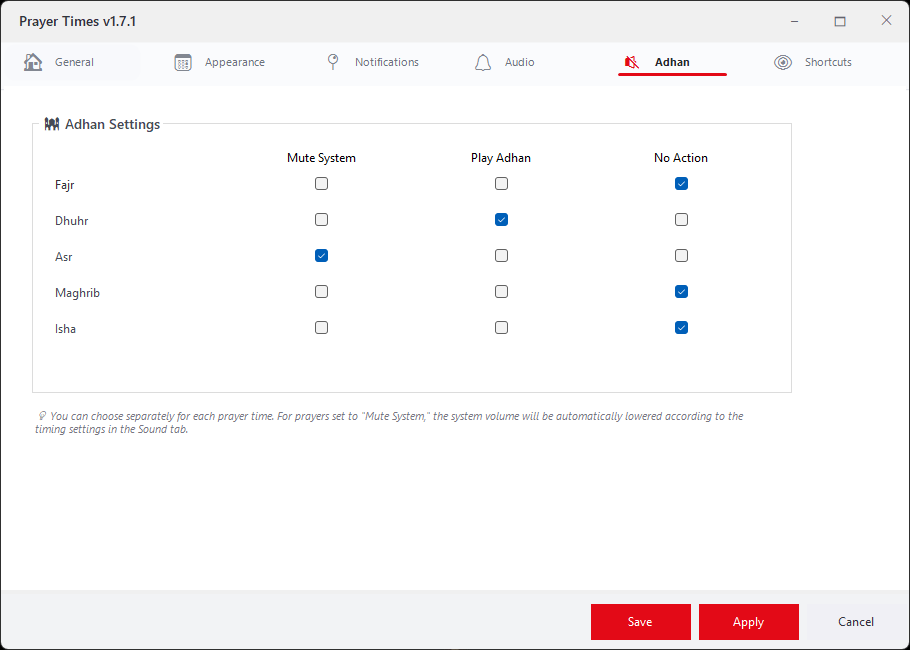
- 🔊 Adhan & Auto Volume: Per prayer time, choose to play the adhan, mute the system, or do nothing
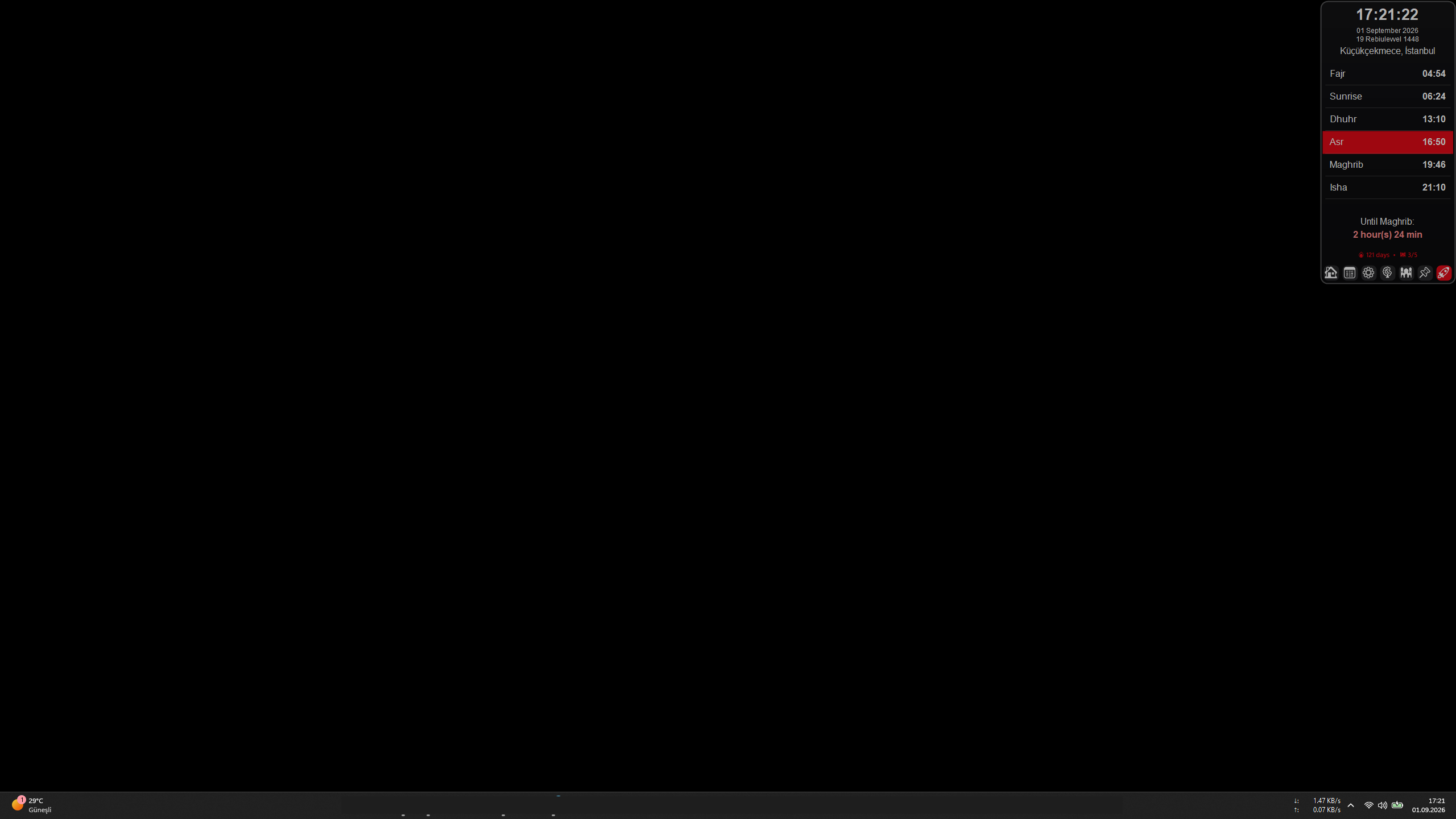
- 🕒 Tray Icon with Remaining Time: See the time left until the next prayer right on the taskbar icon
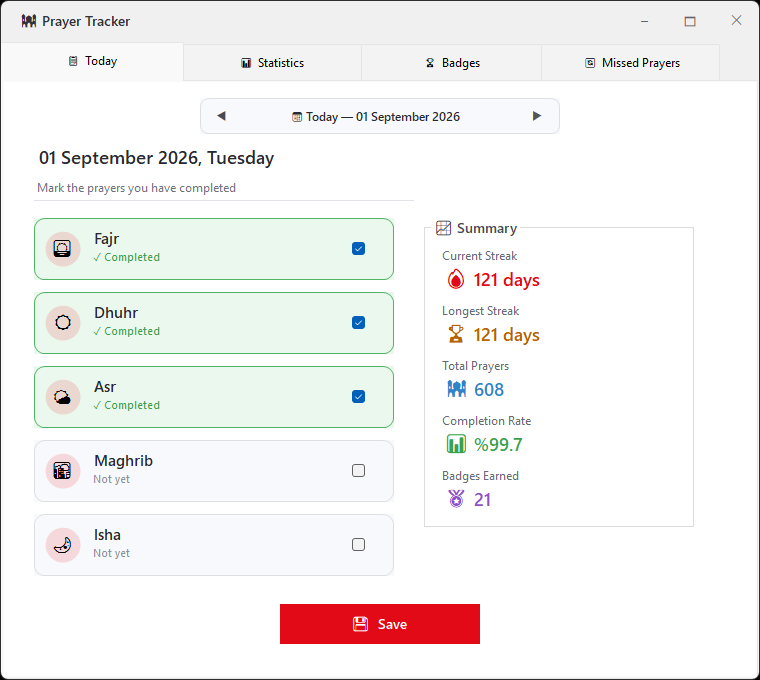
- ✅ Prayer Tracker & Badges: Daily prayer log, streaks, statistics and 32 badges
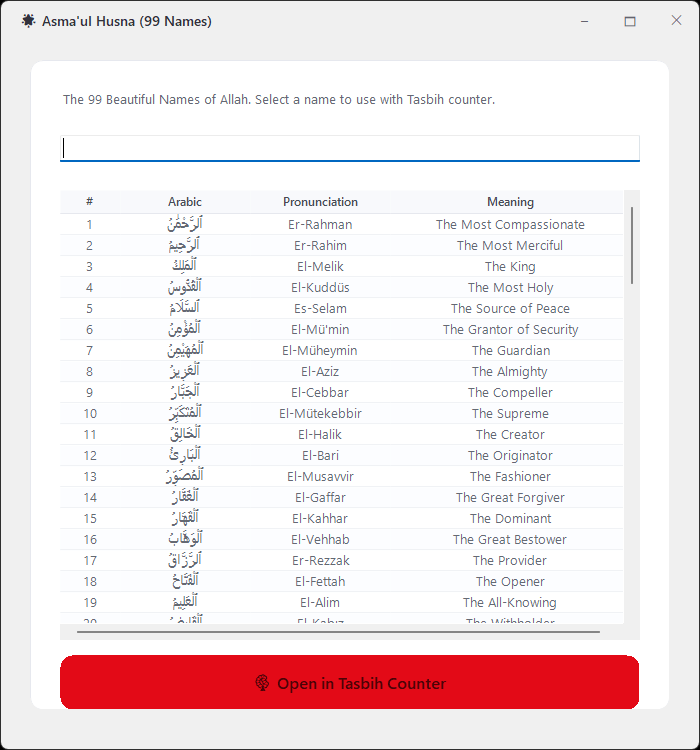
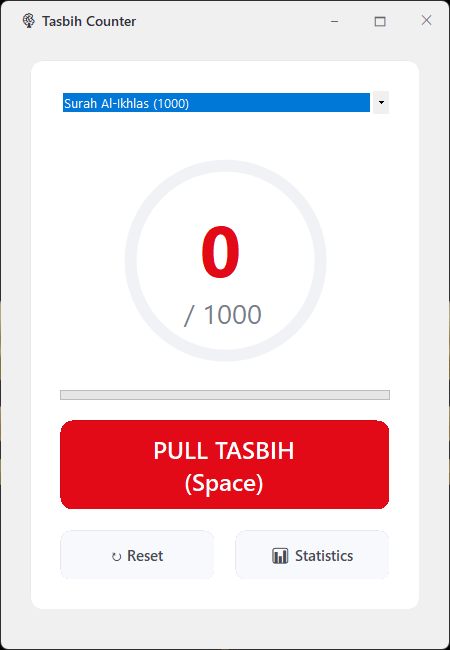
- 📿 Tasbih Counter: Digital Tasbeeh (target setting, statistics, 99 Names of Allah)
- 🌙 Ramadan Mode: Iftar/Suhoor countdown, automatic theme switching
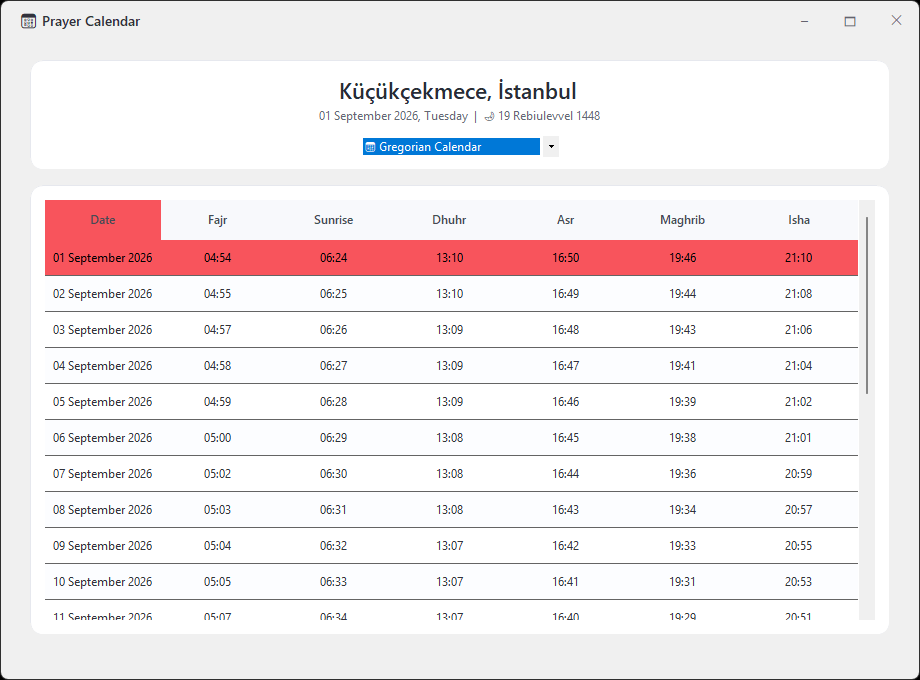
- 📅 Hijri/Gregorian Calendar: 30-day prayer times, dual calendar system
- 🎨 Customizable: 12 theme colors, transparency, notification sounds, compact prayer table
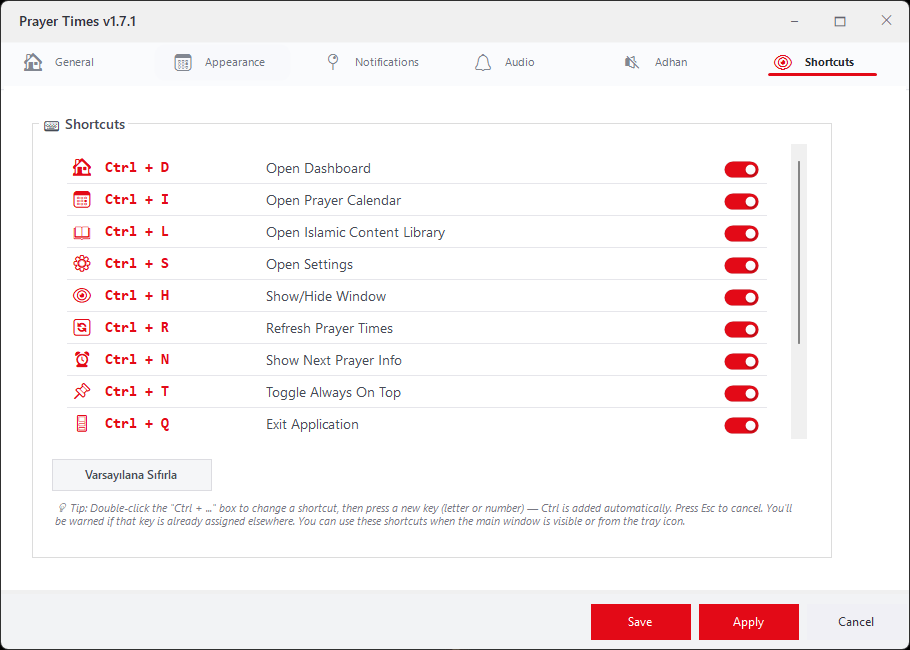
- ⌨️ Keyboard Shortcuts: Fully customizable Ctrl+ shortcuts for quick access
- 💾 Offline Support: Works without internet connection
- 🔔 Windows Notifications: Notification Center, one-tap tracking with “Have you prayed?”
- 📆 Calendar Export: 31 days of prayer times to Outlook / Google / Apple Calendar (.ics)

🚀 Microsoft Store
Get it from the Store for automatic updates and easy setup:

📦 Alternative Download
You can also manually download the portable versions here:
🚀 Installation
- Download: Get the ZIP file using the button above
- Extract: Unzip to any folder you prefer
- Run: Double-click
NamazVaktiApp.exe - Select Location: Choose your location on first launch
- Ready! The app is ready to use
Note: This application requires .NET 8 Runtime!
❓ Frequently Asked Questions
Is the app free?
Yes, completely free and portable — no installation required.
Does it work offline?
Yes! The app caches prayer times on your device (a month at a time) and keeps working without internet.
Are the prayer times accurate?
Prayer times are downloaded for your selected country, city and district and refreshed automatically. If the data is ever out of date (for example, no internet), the app shows a ⚠ warning instead of silently showing old times.
Which systems are supported?
Windows 10 and Windows 11 (32-bit and 64-bit)
The app doesn’t start with Windows. What can I do?
First check that “Start with Windows” is on in Settings, and that the app isn’t disabled under Windows Settings → Apps → Startup. Then open %LocalAppData%\NamazVaktiApp\startup.log (Microsoft Store version: look under %LocalAppData%\Packages in the app’s own folder) and send it to me — it only contains technical start-up steps, no personal data.
🖼️ Screenshots

📝 Version History
v1.7.3 (November 08, 2026)
✨ New Features
- 🔔 Windows Notifications: Prayer-time and pre-prayer alerts now appear in the Windows Notification Center, where missed alerts wait for you, and they respect your Focus/Do Not Disturb settings. You can switch back to the in-app notifications from the tray menu or Settings.
- ✅ “Have You Prayed?”: A while after a prayer time begins (15, 30, 45 or 60 minutes — your choice), a notification with a “Prayed ✓” button lets you log the prayer in the Prayer Tracker with a single tap. It won’t ask if you’ve already marked it, it’s an excused day, or the next prayer has started. Works even when the app is closed.
- ⚙️ Notification Center & Reminders: A new section in Settings → Notifications. Turn Windows notifications, the “Have you prayed?” question (and its delay) and evening reminders on or off individually.
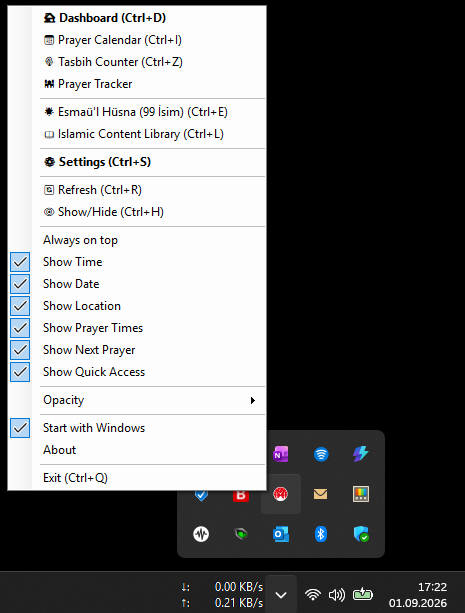
- 📆 Export to Calendar (.ics): Add the next 31 days of prayer times to Outlook, Google Calendar or Apple Calendar, with a reminder when each time begins. From the Calendar window or the tray menu; no internet needed.
- 🕌 Friday Sermon: Open the official sermon page of Turkey’s Presidency of Religious Affairs (Diyanet) from the tray menu in one click. Highlighted in the menu on Fridays.
- 🔄 New Update System: New versions are now detected while the app is running, not only at startup. The Microsoft Store version updates right from inside the app; the blog version opens the download page. “Skip this version” skips only that version — you’ll still hear about the next one. The About window shows the update status with a one-click “Update now”.
🔧 Improvements & Bug Fixes
- 🕒 Tray Icon: Digits are large enough to fill the box and crisp; two-digit hours like “10h” are no longer cut off.
- 🎙️ Quran audio downloads now work in the Microsoft Store version too; an interrupted download no longer leaves a broken file.
- 🛡️ Prayer tracking data is now saved with a backup; a power cut or unexpected shutdown can’t wipe your history.
- 💾 Your settings (city, theme, adhan choices…) are kept after version updates.
- 🔈 If the app closes unexpectedly while the system is muted for the adhan, system sound is restored on the next start.
- 🌙 Evening reminders fixed: the streak warning now shows, and the reminder isn’t missed if the PC was asleep at 22:00; no reminders on excused days.
- 🌤️ Weather finds cities abroad correctly and shows the description in the app’s language.
- 📅 Fixed a date issue on systems whose Windows region uses the Hijri calendar.
- 🛠️ Fixed the same prayer warning appearing twice; adhan and notification sounds are more stable.
- 🧹 Settings → Notifications and Prayer Tracker → Today are tidier; the date picker now shows the weekday (“November 07, 2026, Saturday”) and Excused Day sits at the top.
- ✨ The About window has only a close button; fixed flicker when dragging the About, Calendar and message windows. The update window follows the app language and is high-DPI friendly.
v1.7.2 (November 01, 2026)
✨ New Features
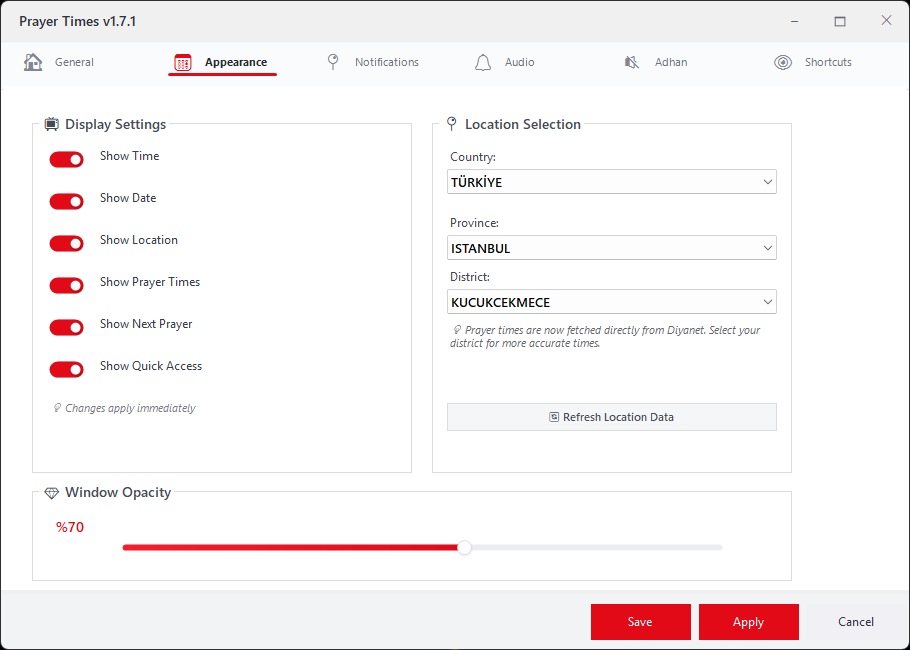
- 🕒 Tray Icon with Remaining Time: The taskbar icon now shows how long is left until the next prayer: minutes up to 59 (59 … 1), then hours as “4h”, “3h”, “2h”, “1h” (rounded to the nearest hour). The icon fills a colored box in your theme color, with dark text on light themes (yellow, turquoise…) and white text on dark ones. Hovering shows all of today’s times. Toggle it from the tray menu or Settings → Appearance.
- 📋 Compact Prayer Table: A slimmer table that takes less screen space. Switch via the tray menu, Settings, or by clicking the table.
- 🔊 Redesigned Adhan Tab: A cleaner segment selector in your theme color, a new “Play / Stop Adhan” test button, and a separate adhan volume slider.
- 🌿 Excused Day (Prayer Tracker): Mark days of illness, travel or special circumstances as “Excused” — your streak is protected, no explanation needed.
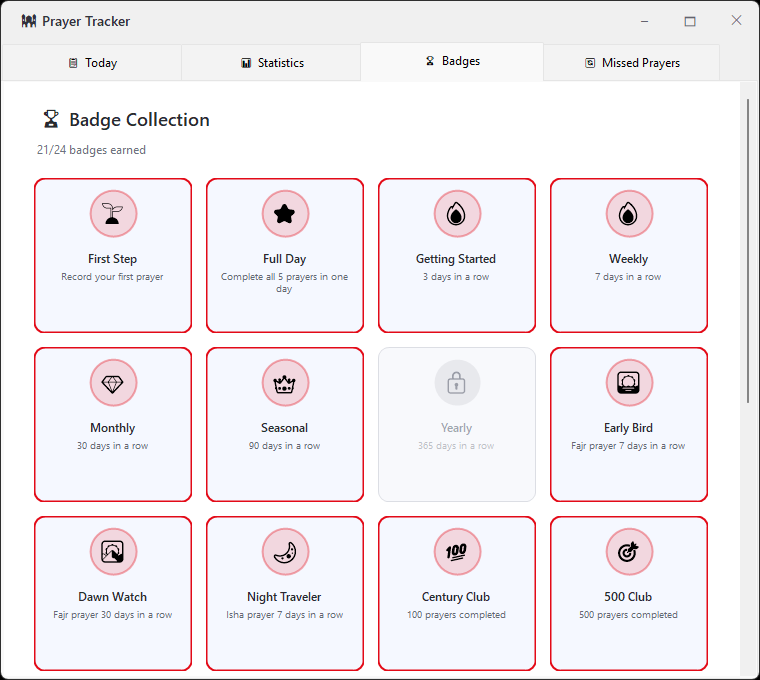
- 🏅 7 New Badges (32 total): Friday Regular for 1, 3 and 6 months, Fresh Start, Consistency, Debt Payer, and Account Closed. The old “Hundred Qada” badge was retired so we don’t push people toward piling up missed prayers — and the new total (32) lines up neatly in the badge window.
- 🌙 Ramadan Warrior Badge: It can now actually be earned — Ramadan progress is tracked from the first day.
- 🔁 Resilience: Times refresh automatically after your PC wakes from sleep or the date changes; when there’s no internet the app retries quietly with growing intervals and shows a ⚠ marker if data is stale — only one error message instead of repeated pop-ups.
- 🧪 Startup Diagnostics: A small
startup.logfile (no personal data) helps find why the app may not have started with Windows.
🔧 Improvements & Bug Fixes
- 🏆 Perfect Week / Perfect Month: Now calendar-based (Mon–Sun and a full calendar month, with a small excused-day allowance). “7 Flawless Days” and “30 Flawless Days” are separate, consecutive-day badges.
- 🛠️ Fixed a false “Isha time has entered” message / adhan after waking from sleep or at midnight.
- 🛠️ The sunrise notification now correctly reads “Sunrise” instead of “Sunrise time has entered”.
- 🖥️ Fixed widget scaling on high-DPI displays and removed the widget height cap; fixed snapping on multi-monitor setups.
- 💬 Fixed quick-access tooltips shifting after a language change.
- 🎨 Theme color now applies instantly in Settings (including the streak label); Ramadan theme no longer overwrites your own choice.
- 🛠️ Fixed “182 days” showing in English where the unit should follow the language; “Last updated” now reflects real downloads only.
- ✨ Segoe UI font across the widget, smooth fade transitions between windows, and a gentle highlight animation when a prayer time begins.
v1.7.1 (September 01, 2026)
✨ New Features
- 🕌 Adhan Settings: Our most requested feature has arrived! Choose separately for each prayer time (Fajr, Dhuhr, Asr, Maghrib, Isha) between “Play Adhan,” “Mute System,” or “No Action.” A fully flexible experience, tailored to you.
- 📖 32 Obligations (Farz): A new section has been added to the Islamic Library — the 6 articles of faith, the 5 pillars of Islam, the 12 obligations of prayer, the 4 obligations of ablution, the 3 obligations of ritual bath, and the 2 obligations of dry ablution — all sourced from the official references of Turkey’s Presidency of Religious Affairs (Diyanet).
- ⚖️ School Comparison: Compare the differences between the Hanafi, Shafi’i, Maliki, and Hanbali schools on ablution, ritual bath, dry ablution, and prayer, in an easy-to-read comparison table.
🔧 Improvements & Bug Fixes
- 🗂️ Settings Screen Reorganized: Location and Appearance tabs merged into a single “Appearance” tab, and a new “Adhan” tab was added for the new settings.
- ⚡ Location Loading Fixed: Country, city, and district lists are now cached persistently on your device — no more reloading every time you open Settings or return after a long break. A manual “Refresh Location Data” button is also available.
- 🌍 Localization Improvements: Fixed an issue where some settings tabs didn’t update immediately after a language switch.
- 🛠️ General Stability: Various minor visual and stability improvements.
v1.7.0 (August 17, 2026)
✨ New Features
- ⌨️ Customizable Keyboard Shortcuts: A new “Shortcuts” tab has been added to Settings. Enable or disable each shortcut individually, double-click the “Ctrl + …” box to assign your own key, get warned on conflicts, and reset everything to defaults with one click.
- 💡 Shortcut Hints: Hovering over quick-access widget buttons now shows their keyboard shortcut, so you never have to remember them.
- 🎨 Expanded Theme Palette: Theme color options grew from 8 to 12 (added Indigo, Brown, Slate, and Lime). Plus, hit “🎲 Try My Luck” for a completely random color pick.
- 🕐 Last Sync Indicator: The General tab in Settings now shows when prayer times were last successfully updated — added transparency during connectivity issues.
🔧 Improvements & Bug Fixes
- 🛠️ Fixed layout and width issues in the Shortcuts tab.
- 🛠️ Fixed some toggle switches appearing off on load even when enabled.
- ⚡ Improved app resilience across several scenarios (language switching, opening Settings).
v1.6.5 (August 13, 2026)
✨ New Features
- ✅ Prayer Time Notification: A subtle, visual-only notification now appears when a new prayer time begins.
- ℹ️ Startup Status Indicator: If “Start with Windows” is blocked by Windows (user setting or system policy), Settings now shows an info icon explaining why.
🔧 Bug Fixes
- 🕌 Prayer Table Visibility Fix: Fixed an issue where the prayer table widget would reappear even if you had hidden it, when the app started automatically with Windows.
- ⚡ Stability Improvements: Resolved background issues that could occasionally cause the app to freeze or close unexpectedly.
v1.6.4 (August 12, 2026)
🔧 Bug Fixes
- 🚀 Startup Fix: Fixed an issue where “Start with Windows” would stop working after app updates. The app now uses Windows’ native startup task system, so your setting survives future updates regardless of install path changes.
- 🖥️ High DPI Display Fix: Fixed widget buttons appearing cut off and notification icon/text overlapping on displays with scaling set above 100% (125%, 150%, etc.).
- 🌍 Location Selector Fix: Fixed an issue where the country dropdown in Settings would occasionally fail to load or appear empty on first launch.
v1.6.3 (June 21, 2026)
✨ New Features & Improvements
- 📖 Expanded Islamic Library: Added new Surahs including Ya-Sin, Al-Mulk, Ar-Rahman and Al-Jumu’ah.
- 🕌 Daily Prayer Progress: The streak section now also displays your daily prayer completion progress (e.g. 3/5), making it easier to track today’s prayers at a glance.
- 🎨 Prayer Table Enhancements: Improved active prayer highlighting and visual consistency throughout the desktop widget.
- ⚡ Performance Improvements: Various optimizations have been made to reduce unnecessary UI updates and improve responsiveness.
- 🛠️ Critical Bug Fixes: Several issues reported by users have been resolved to improve overall stability.
- 🖥️ Minimize Feature Removed: Due to compatibility and usability issues on some systems, the minimize button introduced in the previous version has been removed. The application continues to support efficient system tray usage.
- 🔧 General Refinements: Numerous small improvements have been made across the application to provide a smoother user experience.
v1.6.2 (June 14, 2026)
🔧 Improvements
- ✅ Minimize to Taskbar: A new minimize (─) button has been added to the top-right corner of the application window. Clicking it minimizes the app to the taskbar, allowing it to be restored with a single click.
- ✅ Improved System Tray Mode: When the “Show in Taskbar” option is disabled, the application now runs entirely from the system tray without occupying space on the taskbar.
- ✅ Badge System Updated: Badge awarding logic has been improved. Once a badge is earned, it will no longer be removed due to later changes in prayer records. Earned badges are now permanent, creating a more natural and rewarding experience.
v1.6.1 (May 10, 2026)
🔧 Bug Fixes & Improvements
- ✅ Streak Display Fixed: The prayer streak was incorrectly showing as 0 even when an active streak existed. The calculation logic has been corrected — your streak now shows accurately at all times, including days when you haven’t yet logged all prayers.
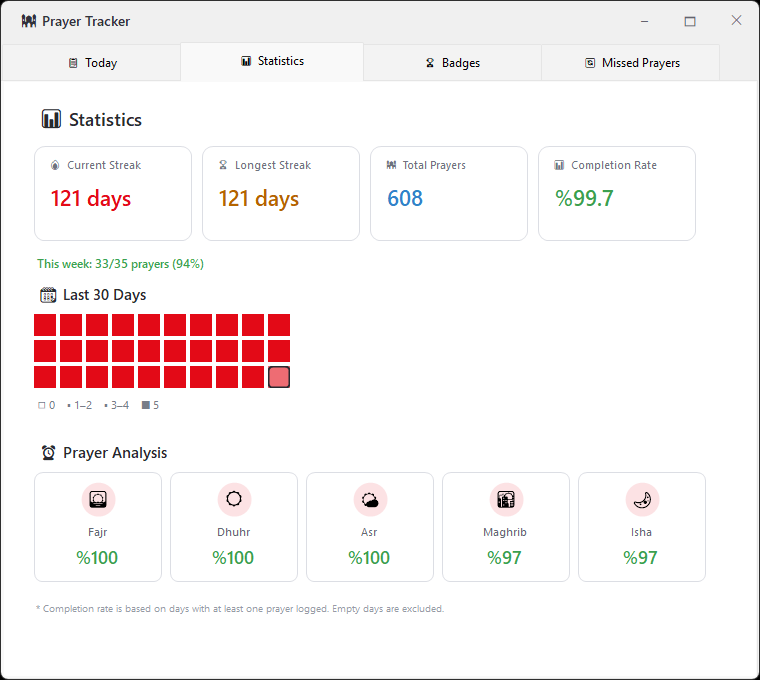
- ✅ Completion Rate Fixed: The completion rate was being skewed by empty days that were silently created when the app checked your prayer status. Empty days are now excluded from all calculations — only days with at least one logged prayer are counted.
- ✅ Accurate Day Tracking: Total days tracked and statistics are now based solely on days where at least one prayer was recorded, making all figures more meaningful and reliable.
- ✅ Statistics Explanation Added: A short note has been added below the prayer analysis section explaining how the completion rate is calculated, so you always know what the numbers mean.
- ✅ Weekly Summary: A new “This week” line now appears above the 30-day heatmap, showing how many prayers you’ve completed this week at a glance.
- ✅ Live Summary Panel: The summary panel on the Today tab now updates immediately after saving prayers — no need to close and reopen the tracker.
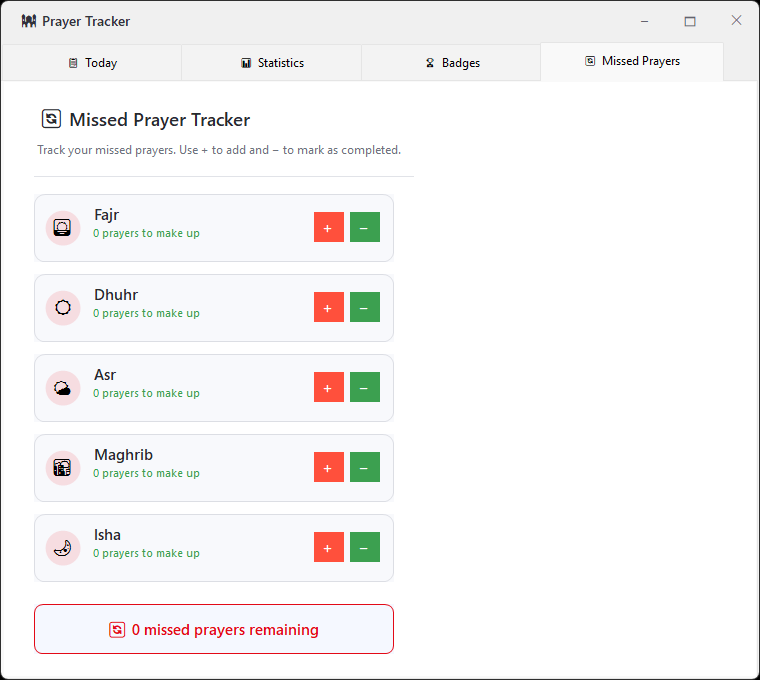
- ✅ Qada Completion Celebration: When you bring a missed prayer count down to zero, the app now shows a brief congratulatory toast notification.
- ✅ Streak Protection Reminder: If you have an active streak and haven’t completed all prayers by 11:00 PM, the app will gently remind you how many prayers are left to protect your streak.
v1.6 (May 10, 2026)
✨ New Features
- 🗓️ Retroactive Prayer Logging: You can now mark prayers for any of the past 7 days — not just today. Use the date navigator in the Prayer Tracker to go back and fill in missed days.
- 🔄 Missed Prayer Tracker (Qada): A brand-new tab to keep count of prayers you need to make up. Add prayers with + and reduce the count as you complete them. Your total is always visible at a glance.
- 🏆 Expanded Badge Collection: 13 new badges added, including Dhuhr Devotee, Asr Guardian, Sunset Pilgrim, Perfect Week, Perfect Month, 30-Day Tracker, 100-Day Tracker, Ramadan Warrior, and more. Now 25 badges total to earn.
- 🎨 Themed Icons: Prayer icons across all tabs now appear in your chosen theme color, giving the app a more cohesive and personalized look.
🔧 Improvements
- ✅ Smarter Badge Logic: Badges are now recalculated on every save. Incorrectly awarded badges are automatically corrected. Streak badges are permanent once earned.
- ✅ Date-Aware Navigator: The date title and subtitle in the Prayer Tracker now update correctly when navigating between days.
- ✅ Save Confirmation Toast: Instead of a popup dialog, saving prayers now shows a subtle, auto-closing toast notification in your theme color.
- ✅ Sabah Localization Fix: The Fajr prayer is now correctly labeled “Sabah” in Turkish across all screens.
v1.5 (May 8, 2026)
✨ New Features
- 🕌 Prayer Tracker — Gamification System: Track your daily prayers and build healthy habits!
- Mark each of the 5 daily prayers as completed with a single tap
- 🔥 Streak system: Track consecutive days of complete prayer (3, 7, 30, 90, 180, 365 days)
- 📊 Statistics dashboard: 30-day heat map, per-prayer completion rates, and overall progress
- 🏆 Badge collection: 15 unique badges to earn (Early Bird, Night Traveler, Century Club, and more)
- 🔒 100% private: All data is stored locally on your device — never uploaded to any server
- 🔥 Streak Display: Your current prayer streak is now shown directly on the main widget for daily motivation.
- 🔔 Evening Reminder: If you haven’t logged your prayers by 10:00 PM, the app gently reminds you — so no day goes unrecorded.
🔧 Improvements
- ✅ Single Instance Forms: All windows (Dashboard, Calendar, Settings, Prayer Tracker, etc.) now open only once — clicking again brings the existing window to the front instead of opening a duplicate.
v1.1.1 (April 5, 2026)
🔧 Improvements
- ✅ Localized Location Names: Country, city, and district names are now displayed in the app’s selected language (Turkish/English), making location selection much easier — especially for international users.
- ✅ Alphabetical Sorting: All location dropdowns (country, city, district) are now sorted alphabetically based on the active language, ensuring a smoother and more intuitive selection experience.
- ✅ Live Language Switch: Location dropdowns now update instantly when the language is changed — no need to close and reopen the settings window.
- ✅ We sincerely apologize for the delay in delivering this improvement. Thank you for your patience! 🙏
v1.1.0 (March 19, 2026)
🔧 Improvements
- ✅ All forms have been redesigned with a modern and cleaner user interface.
- ✅ Visual consistency has been improved with sharper, more refined UI components.
- ✅ Localization issues have been resolved, ensuring better language accuracy and consistency across the app.
v1.0.7 (March 05, 2026)
✨ New Features
- 📖 Islamic Content Library: Quran, Prayers, and Hadiths
- 28 Surahs (Arabic, translation, transliteration)
- 36 Prayers (organized in 6 categories)
- 40 Hadiths (from authentic sources)
- Favorites system
- Smart search (NLP-powered)
- 🎙️ Quran Audio Recitation: Professional reciters
- 5 renowned reciters (Alafasy, Abdulbasit, Husary, Sudais, Minshawi)
- Download and offline playback
- Delete downloaded audio option
🔧 Improvements
- ✅ Settings screen reorganized (Reciter selection moved to Appearance tab)
- ✅ Audio buttons now responsive design
- ✅ All texts update correctly after language change
- ✅ Localization issues fixed
v1.0.6 (February 23, 2026)
- Asma’ul Husna (99 Names of Allah): Turkish and English meanings, Tasbih integration
- ✅ Ramadan mode improvements (Iftar/Suhoor switching bug fixed)
- ✅ Translation inconsistencies resolved
v1.0.5 (February 20, 2026)
- 📿 Tasbih Counter: Digital Tasbeeh feature (quick access and tray menu)
- 🗓 Hijri Calendar: Hijri dates alongside Gregorian in prayer calendar
- ✅ Drag & drop improvements
- ✅ Settings stability via Dashboard
- ✅ Ramadan notification flow fixes
v1.0.4 (February 13, 2026)
- 🎨 8-Color Theme Palette: Orange, Red, Blue, Green, Yellow, Turquoise, Purple, Pink
- 🔔 Notification Sounds: On/off toggle, volume control (0-100%), test button
- 🌙 Ramadan Special: Iftar/Suhoor countdown, auto golden theme, welcome message
v1.0.3 (February 04, 2026)
- ⌨️ Keyboard Shortcuts: 11 Ctrl+ combinations (Dashboard, Calendar, Settings, etc.)
- 🖱️ Double-Click Behavior: User-customizable preferences
- ✅ Settings UI redesigned (GroupBox-based)
v1.0.2 (January 14, 2026)
- ⚡ API call reduction (caching system)
- ✅ Badge visibility issue fixed
- ✅ Countdown flickering resolved
v1.0.1 (January 13, 2026)
- 🌍 Support for 203 countries, 4,120+ cities
- 🇹🇷 🇬🇧 Dual language support (Turkish/English)
- ⏰ Prayer time countdown
- 🔔 3 independent notification system
- 🔇 Automatic audio management
- 📅 Monthly prayer times calendar
🔗 Links
💬 Feedback
Do you like the app? Have questions or suggestions?
For suggestions or issues regarding the software, please leave a comment or contact me directly via e-mail.

There is a bug where if the app is auto starting, you need to make a change in the appearance section to apply the last saved settings. In other words, saved config is not being executed. Only after one change the appearance settings will be updated.
Thank you for the detailed report! You’re absolutely right — we found the issue: the prayer table widget wasn’t reading its saved visibility setting on startup, so it would appear even if you had turned it off, until you touched Settings again. This is a genuine bug on our end, not something caused by your configuration. We’ve identified the exact cause and a fix is already prepared — it will be included in v1.6.5, coming very soon. Thanks so much for taking the time to report this clearly, it really helps us improve the app! 🕌