
Windows 11 users are receiving 0xc0000135 errors when attempting to launch applications after installing the recent Windows 11 KB5013943 cumulative update.
Yesterday, Microsoft released new Windows cumulative updates to fix security vulnerabilities and bugs as part of the May 2022 Patch Tuesday.
These updates include the Windows 11 KB5013943 update, which included fixing a bug causing .NET Framework 3.5 apps not to open if they used the Windows Communication Foundation (WCF) and Windows Workflow (WWF) components.
KB5013943 update breaks .NET applications
However, Microsoft’s fix seems to have caused further issues, as now Windows 11 users are reporting [1, 2, 3, 4, 5] a wide variety of applications that can no longer open after installing the KB5013943 update.
Affected applications vary per user, but some of the reported problems include ProtonVPN, PowerShell, Event Viewer, Sound Blaster Command, KeePass, Visual Studio, Discord, ShareX, and more.
When attempting to open the application, Windows 11 displays an error stating, “The application was unable to start correctly (0xc0000135). Click OK to close the application.”, as shown below.
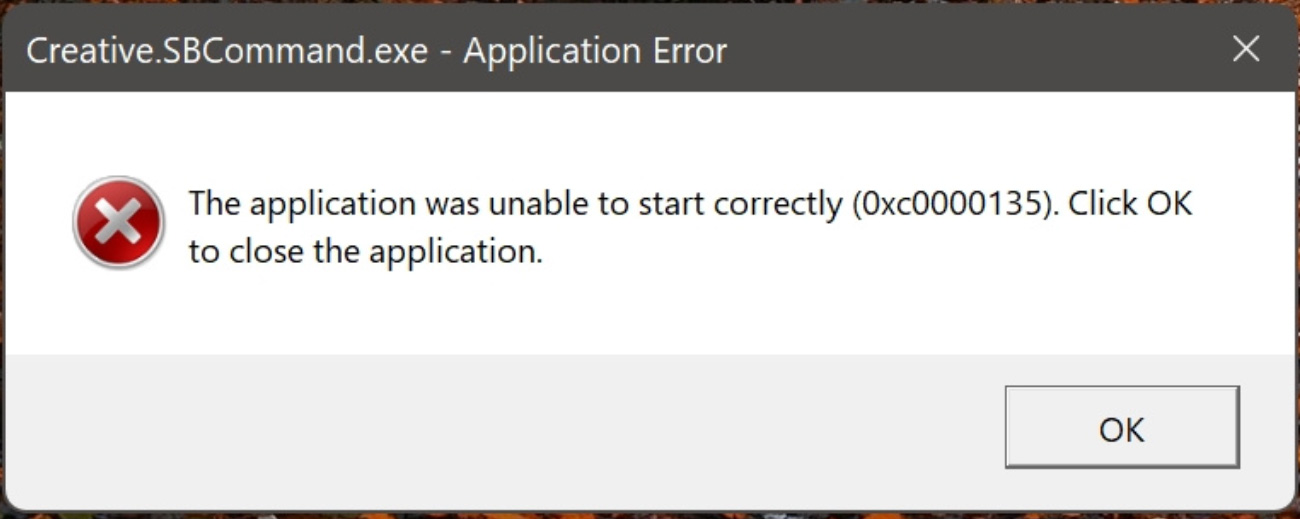
Source: answers.microsoft.com
“So I just updated my laptop to the newest version of Windows 11 and I am getting a lot of application errors and auto startup errors for apps. Is there a way to fix this? Error 0xc0000135,” a user posted to the Microsoft Answers forum.
“Is anybody running into an error after KB5013628 / KB5013943 – The application was unable to start correctly (0xc0000135) unable to start any .NET 4.8 programs – bing/visual studio, etc,” explained another user on Twitter.
The 0xc0000135 error indicates that the application failed to find a DLL file required for the program to operate correctly, so the program could not start. In this particular issue, it appears that the application is looking for .NET DLLs and is unable to find them.
Uninstalling the Windows 11 KB5013943 update resolves the problem but leaves the device unprotected against newly patched vulnerabilities.
Windows 11 users have discovered that it is possible to fix this issue by ensuring the .NET 3.5 framework is enabled or reinstalling it.
To do this, you can go to Control Panel > Programs > Turn Windows features on or off and make sure .NET Framework 3.5 (includes .NET 2.0 and 3.0) and Net Framework 4.8 Advanced Services are checked, as shown in the image below.
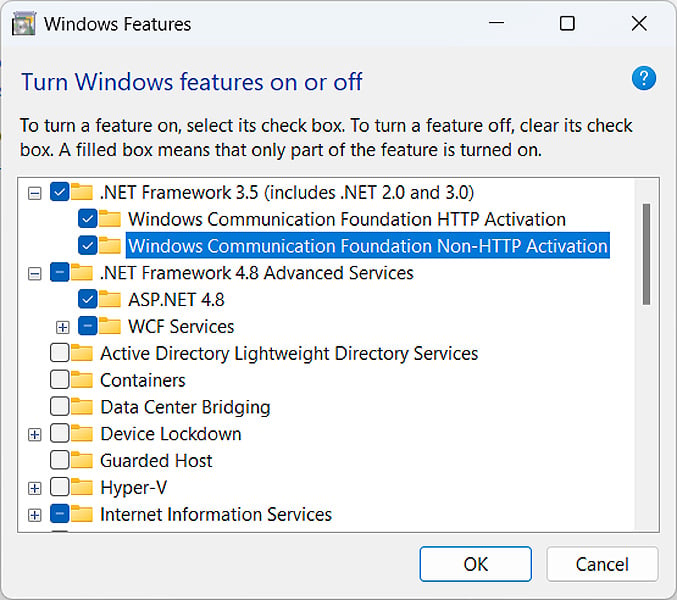
Alternatively, you can open a Windows 11 elevated command prompt (Run cmd.exe as an administrator) and execute the following commands to enable the features.
dism /online /enable-feature /featurename:netfx3 /all
dism /online /enable-feature /featurename:WCF-HTTP-Activation
dism /online /enable-feature /featurename:WCF-NonHTTP-Activation
If this does not work, you should uninstall the .NET features from the Control Panel and then reinstall them to perform a repair process.
Finally, if all else fails, you can uninstall the KB5013943 update. However, this is strongly discouraged as it will leave your device unprotected from the latest security threats.
Thanks to bleepingcomputer.com for the article.